Professional editors spend as much time managing footage as they do shaping the final story. Hours can disappear into reviewing takes, finding a specific shot, removing pauses, syncing cameras, organizing sequences, and preparing different versions of the same project.
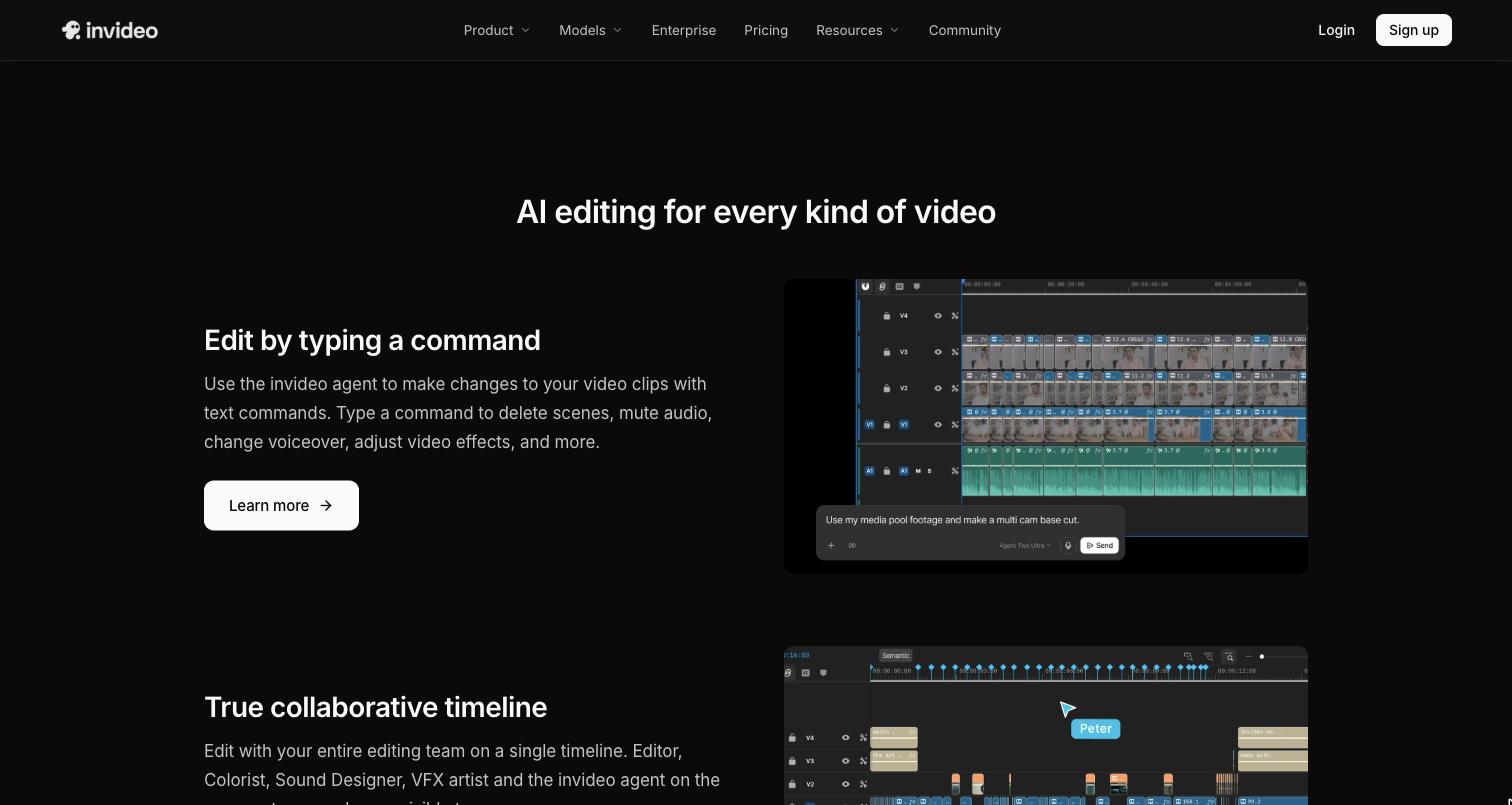
AI editing agents can take on some of that work. The difference from conventional AI video tools is where the work happens. Instead of generating a finished video outside the editing process, an agent can work with the footage and make changes inside an editable timeline.
That opens up a more practical way to use AI. The editor can delegate repetitive tasks, inspect the result, change anything that does not work, and continue editing normally. The creative decisions stay with the person behind the project.
What AI Editing Agents Actually Do
An AI editing agent is built to handle a series of related editing tasks from a natural-language instruction.
Give it a collection of footage and a clear direction, and it can review the material, identify relevant clips, remove repetition, assemble sequences, or make other changes based on the task.
That makes agents different from individual AI features. Automatic captions might solve one task. Noise reduction might solve another. An agent can work across several steps that normally require an editor to move through the project manually.
The difference becomes more noticeable with large footage libraries. Finding the right interview answer, comparing several takes, or building an initial sequence can take considerably longer than making the final creative decisions.
Why the Timeline Still Matters
The timeline is where an editor can see whether individual choices actually work together.
A selected clip may be technically clean but feel too slow. A different take may have better delivery but introduce a continuity problem. A cut that works on its own may create an awkward transition when placed next to another shot.
An AI system can make a useful first pass, but those decisions still need to be visible and editable.
That is why AI editing agents are more useful when they work directly inside the project. Invideo editor follows this approach by combining AI editing agents with an editable timeline. The agent can work on uploaded footage while the editor remains able to inspect the clips, change the sequence, and continue editing manually.
This keeps AI assistance connected to the actual editing process instead of producing a separate result that has to be rebuilt in another application.
Start With the Most Repetitive Parts of the Edit
There is no need to hand an entire project over to an AI agent. Editors can start with the tasks that consume the most time but require relatively little creative judgment.
Build a first assembly
The first assembly is often one of the most time-consuming stages of post-production. An editor may need to watch several takes of the same line, remove false starts, cut long pauses, and work out how the usable material fits together.
An agent can take on much of this initial work.
With invideo editor, an editor can upload footage, add a script or transcript when available, and describe how the material should be assembled. As a video editor with AI agents, it can review the footage, select usable takes, remove repeated material, and place the selected clips on the timeline.
The resulting base cut is not supposed to replace the editor’s work. It gives the editor a complete sequence to react to and refine.
That changes the starting point. Instead of opening an empty timeline and working through every clip manually, the editor begins with a structured first pass.
Find moments without digging through folders
Searching through footage is another area where AI can be useful.
Large projects can contain interviews, B-roll, multiple camera angles, product shots, establishing footage, and dozens of similar clips. Traditional organization helps, but it does not always answer a question such as, “Where is the shot of the presenter walking into the studio?”
AI-powered semantic search can make those requests easier to handle. Editors can describe the person, action, object, scene, or moment they need and use the results to locate relevant footage.
This can be particularly useful during documentary editing, interviews, commercial projects, and long-form content where the best shot may be buried deep in the source material.
Compare and select takes
Multiple takes are common in professional production. The challenge is rarely finding one technically usable version. It is deciding which take works best in context.
AI can help narrow the material by identifying usable takes and removing obvious duplicates or weaker material. The editor can then compare the remaining options and make the final selection.
That approach is useful for talking-head footage, scripted scenes, interviews, and other projects where several versions of the same performance exist.
Get a head start on multicam edits
Multicam projects add another layer of preparation. Before an editor can focus on the rhythm of the cut, the footage needs to be synchronized and organized.
An AI agent can assist with that initial process and create a structured sequence from the available angles. Invideo editor supports this type of workflow, including layered multicam assembly that the editor can continue refining on the timeline.
The editor still decides when to stay on a wide shot, switch to a close-up, cut to a reaction, or hold on a particular performance. AI simply reduces some of the preparation required to reach that point.
Give the Agent Direction an Editor Can Actually Use
Natural-language editing works best when the instruction contains enough context to guide the work.
“Edit this video” leaves too much open to interpretation. A useful instruction might specify the structure, length, material to prioritize, and things to remove.
Consider a direction such as:
“Build a 10-minute interview cut. Keep each topic focused, remove repeated answers and long pauses, preserve the natural order of the conversation, and use the close-up when the speaker is delivering the key points.”
That gives the agent an editorial framework without trying to describe every individual cut.
It is also easier to revise. If the first pass feels too slow, the next instruction can focus specifically on pacing. If an important answer was removed, the editor can ask the agent to restore it rather than rebuilding the entire sequence.
Breaking a complicated project into smaller editing tasks can make the process easier to control.
Review the First Pass Like an Editor
An AI-generated timeline should be treated as a first pass.
Watch the complete sequence before making detailed changes. Look at the story, pacing, continuity, and performance choices. Then move into individual sections where something feels wrong.
A clean take is not automatically the right take. A pause may be necessary for the scene to breathe. A reaction shot may carry more meaning than a technically stronger angle. A short piece of apparently unnecessary dialogue may provide context for what follows.
AI can identify patterns in footage, but the editor understands the broader creative intention.
That is why timeline access matters. When the agent’s decisions remain editable, the editor can replace a clip, change the timing, restructure a section, or simply remove an AI-made decision.
Use AI Beyond the Rough Cut
AI assistance can remain useful after the first assembly.
Once the main sequence is working, agents can help with tasks such as restructuring sections, adjusting duration, removing silence or filler, finding alternate takes, and creating cutdowns for different platforms.
The finishing stage can also benefit from AI-assisted direction without removing manual control.
Colour grading is one area where this can be useful. An editor might ask for a warmer visual treatment, a softer contrast, or a cinematic look. A reference frame can also communicate the intended direction more clearly than a written description.
Invideo editor combines this type of AI-directed grading with manual controls for exposure, contrast, temperature, tint, saturation, colour wheels, curves, and LUTs. That allows an editor to start with an AI-directed look and then make more precise adjustments when the footage requires them.
The same principle applies to audio cleanup, transitions, localization, and versioning. Automation can reduce repetitive work while the editor continues to make the decisions that affect the finished piece.
Keep Creative Control at Every Stage
The most useful AI workflow is not the one that automates the most actions. It is the one that puts automation in the right places.
An editor may want an agent to review six hours of footage but still personally select the final performance. They may want AI to create a first assembly but manually reshape the opening. They may use AI to establish a colour treatment and then adjust individual shots themselves.
Those boundaries will differ from project to project.
Keeping the work inside an editable timeline makes those choices easier. The editor can see what happened, change it, and continue from the same project without rebuilding the edit around an AI-generated output.
A Practical Workflow for AI-Assisted Editing
A simple process can keep AI useful without making the workflow difficult to manage.
1. Bring in the source material
Upload the footage and add a script, transcript, or other project information when it is available. Give the agent enough context to understand what it is working with.
2. Assign one clear editing task
Start with a specific objective such as building a base cut, removing repeated takes, organizing multicam footage, or finding particular moments.
3. Inspect the timeline
Watch the result and look beyond whether the individual cuts appear technically correct. Check the story, pacing, continuity, and performance.
4. Redirect the agent
If something needs changing, describe the problem and the desired result. A more precise second instruction is usually more useful than starting the entire edit again.
5. Make the creative decisions manually
Adjust timing, performances, transitions, sound, colour, and composition where human judgment matters most.
6. Create the required versions
Once the main edit is approved, use AI assistance for cutdowns, alternate formats, localization, or other repetitive deliverables.
This workflow keeps the editor involved from the first assembly through the final version.
Where Editors Should Keep the Human Decision
Some editing decisions are difficult to reduce to a simple instruction.
Story structure, emotional timing, performance, visual rhythm, and continuity all depend on context. An AI agent may recognize that two clips cover the same information, but it cannot automatically know which delivery best represents the intention of the scene.
The same applies to colour and sound. An automated correction can establish a useful starting point, while the final grade may still require shot-by-shot adjustments. A dialogue cleanup can remove unwanted noise, but the editor still needs to decide whether the resulting sound fits the project.
AI works best when it handles the operational work and the editor remains accountable for the final creative result.
Final Takeaway
AI editing agents can make professional post-production more efficient without turning the editing process into a black box.
The practical difference comes from putting those agents inside an editable timeline. They can review footage, assemble a first cut, search for moments, help with takes and multicam material, and assist with repetitive finishing tasks. The editor can then inspect the work, redirect it, or take over manually whenever the project requires a creative decision.
Invideo editor is one example of this timeline-based approach, combining AI editing agents with the tools needed to continue shaping the project after the initial automated work.
Used this way, AI does not have to replace the editor’s workflow. It can remove some of the work that gets in the way of it, leaving more time for story, pacing, performance, and the decisions that make an edit feel intentional.